Grid plugins
The grid is the basis for responsive page design. It splits the page into containers, rows and columns. Depending on the device, columns are shown next to each other (larger screens) or one below the other (smaller screens).
The details of the grid system are based on the Bootstrap framework. Therefore, for details on how grids work, see, e.g. the Bootstrap 5 documentation.
Container
A container is an invisible element that wraps other content. There are in two types of containers:
- Container
All other containers restrict the width of their content depending on the used device.
- Fluid container
A fluid container occupies the full width available - no matter how wide the viewport (or containing) element is.
- Full container
A full container is like a fluid container and occupies the full width available. Additionally, it does not have a padding. Its content can therefore fill the entire area. Full containers are useful if you want to add a background color or shadow to another DOM element, like, e.g., the contents of a column.
Note
- New feature:
Containers can have a background color (“context”), opacity and shadow.
Component example
To create a container in a Django template, you need to load the frontend tags and then use the plugin template tag to render the container plugin. Below is an example of how you might do this:
{% load frontend %}

<!-- Example of using the plugin template tag for a container -->
{% plugin "container" container_type="container-fluid" %}
    {% plugin "gridrow" %}
        {% plugin "column" xs_col=6 %}
            <p>This is the first column inside the container.</p>
        {% endplugin %}
        {% plugin "column" xs_col=6 %}
            <p>This is the second column inside the container.</p>
        {% endplugin %}
    {% endplugin %}
{% endplugin %}
Row
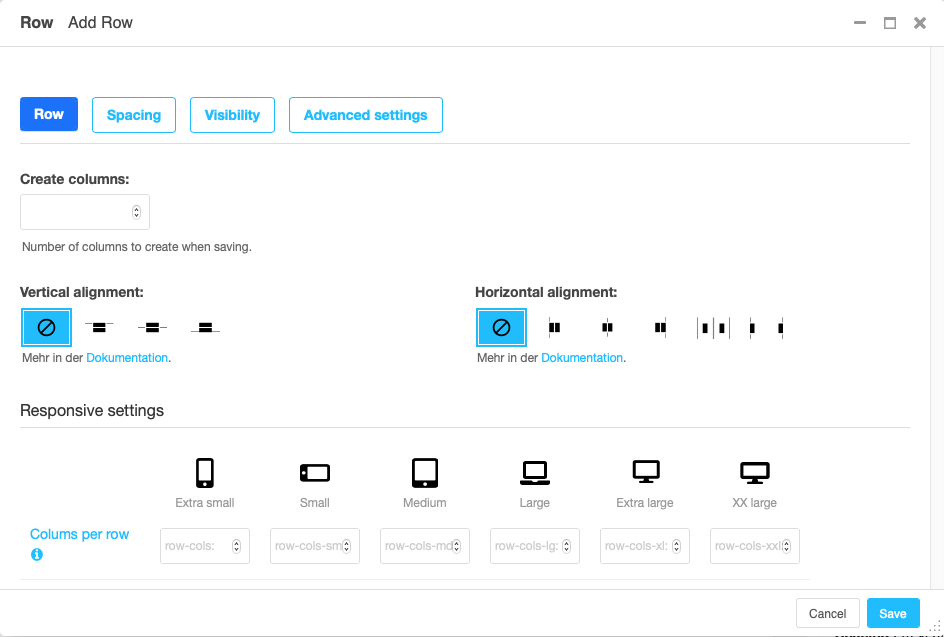
A row contains one or more columns. By default columns are displayed next to each other.
To automatically create not only a row but also some columns within that row, enter the number of columns you will be using. You can always later add more columns to the row or delete columns from the row.
Vertical aligned defines how columns of different height are positioned against each other.
Horizontal alignment defines how columns that do not fill an entire row are distributed horizontally.
Note
New feature:
The section “Row-cols settings” defines how many columns should be next to each other for a given display size. The “row-cols” entry defines the number of columns on mobile devices (and above if no other setting is given), the “row-cols-xl” entry the number of columns on a xl screen.
Column
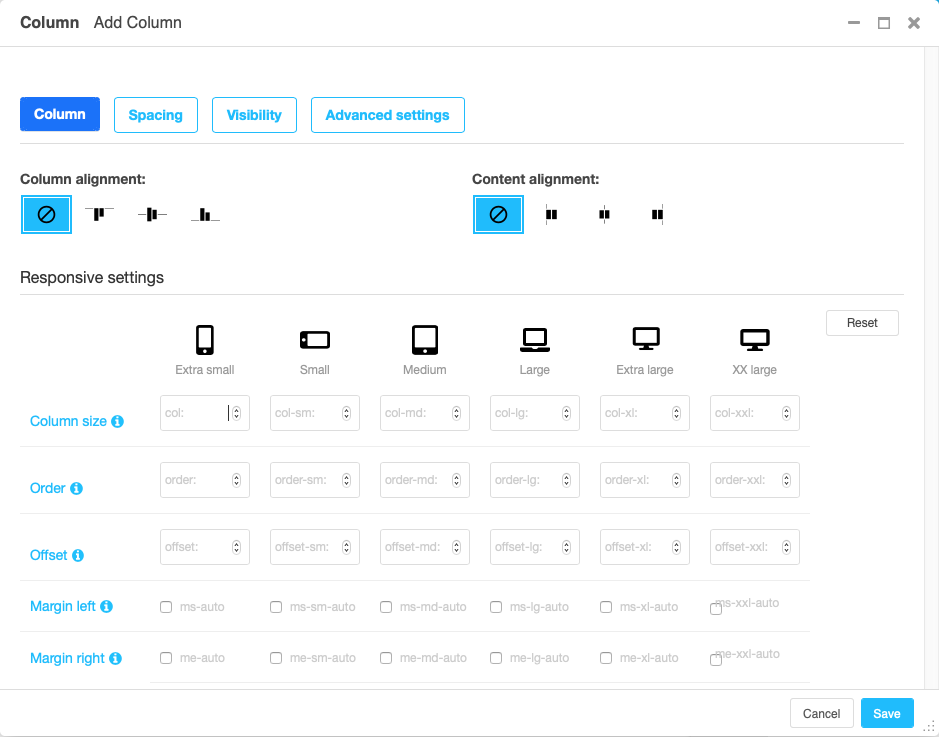
The column settings is largely about how much of the grid space the column will use horizontally. To this end, the grid is divided in (usually) 12 strips of equal width.
- Auto sizing
If no information on the column size is given, the column will be autosizing. This means that all autosizing columns of a row will occupy the same fraction of the space left, e.g. by sized columns.
- Specifically sized columns
If you enter a number the column for the specific screen size will exactly have the specified width. The unit of width is one twelfth of the surrounding’s row width.
- Natural width:
If you need a column to take its natural width, enter
0for its column size. This will displayautofor columns size.
Also, you can adjust the vertical alignment of the specific column from the row’s default setting.
Finally, you can set the alignment of the content to left (right in a rtl environment), center or right (left in a rtl environment). This comes handy if, e.g., the column is supposed to contain centered content.
Note
- Removed:
The column type entry has been removed since it was a legacy from Bootstrap version 3.
Re-usable component example
djangocms-frontend plugins can be used as components. They can be
used in all your project’s templates. Example (if key word arguments are
skipped they fall back to their defaults):
{% load frontend %}
{% plugin "gridcontainer" container_type="container-fluid" %}
    {% plugin "gridrow" vertical_alignment="align-items-center" %}
        {% plugin "gridcolumn" xs_col=12 md_col=6 text_alignment="center" %}
            This content is inside a column.
        {% endplugin %}
        {% plugin "gridcolumn" xs_col=12 md_col=6 text_alignment="center" %}
            This content is inside another column.
        {% endplugin %}
    {% endplugin %}
    This content still is inside a container.
{% endplugin %}
Parameters for {% plugin "gridcontainer" %} are:
container_type: The type of container. Default iscontainer. Otheroptions are
container-fluidandcontainer-full.
Parameters for {% plugin "gridrow" %} are:
vertical_alignment: The vertical alignment of the row. Default isalign-items-start. Other options arealign-items-centerandalign-items-end.
horizontal_alignment: The horizontal alignment of the row. Default isjustify-content-start. Other options arejustify-content-center,justify-content-endandjustify-content-around.
gutters: Size of gutter between columns. Default is3. Otheroptions are
0,1,2,4,5.
row_cols_xs: Number of columns on mobile devices.row_cols{sm|md|lg|xl|xx}: Number of columns on larger devices.
Parameters for {% plugin "gridcolumn" %} are:
column_alignment: The vertical alignment of the column. Default isalign-self-start. Other options arealign-self-centerandalign-self-end.text_alignment: The text alignment of the column. Options areleft,centerandright.xs_col: Number of columns on mobile devices.{sm|md|lg|xl|xx}_col: Number of columns on larger devices.